FAQ Category How to Use in Japan

Can I receive Taiwan calls and SMS for free while in Japan?

Yes, you can use this service if the following conditions are met:

✅ Your smartphone is connected to Wi-Fi
✅ The Wi-Fi Calling function is enabled
✅ You are using a supported device (iPhone / Android)
✅ Your SIM card remains active (not suspended or cancelled)

💰 Charges (Important)
Wi-Fi Calling is treated as if you are using the service in Taiwan.

📞 Making calls
・Calling a Taiwan number → Taiwan domestic call charges
・Calling a Taiwan mobile number → Taiwan domestic rates
・Calling overseas (e.g., Japan) → International call charges

👉 No international roaming charges will apply

📲 Receiving calls
・Receiving calls from Taiwan → Free (same as receiving calls in Taiwan)
🌟 Benefits
・Good call quality when the Wi-Fi connection is stable
・You can make and receive calls without enabling international roaming

How to check my mobile data usage?

【 iOS Device】

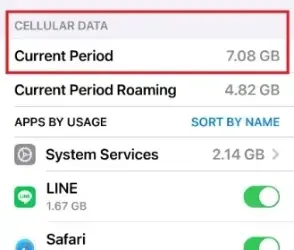
🌸View Used Mobile Data
“Settings” ➔ “Cellular”
➔ “Current Period” shows the total mobile data usage for the current period.
Scroll down to see the mobile data usage for individual apps.

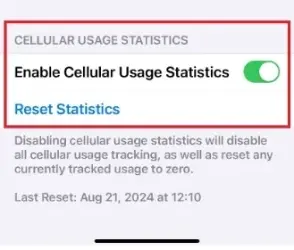
🌸Reset Statistics Before Viewing
“Settings” ➔ “Cellular”➔ scroll to “Reset Statistics” to reset the mobile data usage for the “Current Period” to 0. 📢If you want to view the mobile data usage for a different SIM, please first switch the “Cellular Data” SIM.

【 Android Device】

The Android system may have different screens and operation methods depending on the brand and model. Here, we will explain how to check mobile data usage using the Galaxy A55 as an example.

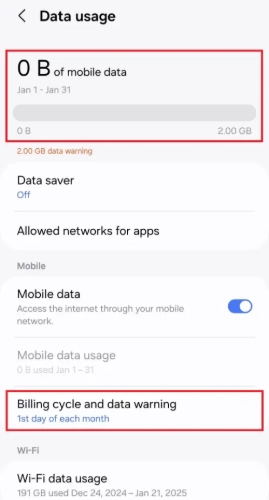
🌸View Data Usage
“Settings”➔”Connections”➔”Data usage”
You can view the total amount of mobile data used in the current billing cycle.

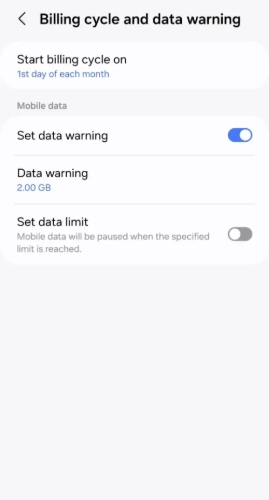
🌸Set Billing Cycle Before Viewing Statistics
“Settings”➔”Connections”➔”Data usage”➔”Billing cycle and data warning”➔to reset the mobile data usage statistics.