
JB Voice eSIM/SIM

日本docomoの090・080・070正規携帯番号
海外でも日本の電話・SMS認証OK

日本在地公司 提供客戶留日期間的中文緊急支援服務

Within Japan

International Roaming

School and examination applications

Emergency contacts and other purposes

Concert ticket reservations

Restaurant reservations

Bank account applications and money transfers

Taxi and train reservations

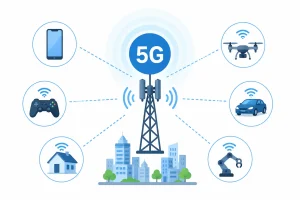
Experience Japan with Nationwide 5G Coverage

Starting July 1, 2026, enjoy faster and smoother connectivity

eKYC Passport Verification System

  • End-to-End Encryption
    Your personal information is fully encrypted and securely protected at every step.
  • International Standard Passport Verification
    Passport authentication technology that complies with internationally recognized standards.
  • Biometric Facial Recognition
    Advanced facial recognition technology helps prevent identity fraud and unauthorized use.
  • Fast Online Verification
    Complete the entire verification process online—no in-store visit or document mailing required.
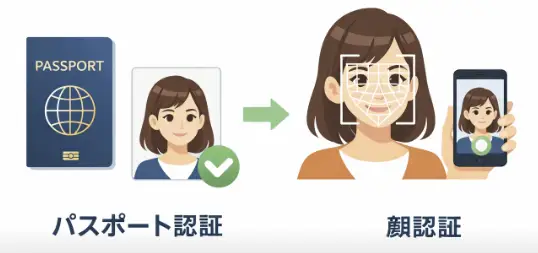
In accordance with the regulations of Japan’s Ministry of Internal Affairs and Communications, identity verification is required when purchasing a JB Voice eSIM/SIM with a Japanese phone number.
After your payment is completed in our online store, you will receive a verification email from biz@jbrg.jp.
😀 The identity verification process is simple and secure : ①Email Verification ② Passport Verification ③ Facial Verification (Selfie)

Tethering Available
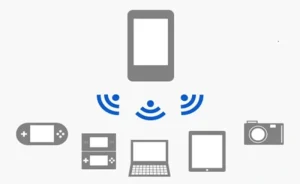
A separate APN configuration is required for iOS and Android devices.

docomo MVNO 5G/LTE

📶According to data published by Japan’s Ministry of Internal Affairs and Communications, as of March 2025

Base StationsLTE(4G)5G
docomo25900852532
SoftBank183486104441
KDDI/au197990110037
Rankuten6715935108

One of Japan’s largest mobile network operators, offering reliable connectivity across suburban and rural areas 🌐docomo Area

◆ Administrative Fee

Administrative Fee: ¥3,500 (¥3,850 including tax)

◆ Monthly Fee

The monthly fee is billed on a monthly basis. A full month’s fee will be charged for both the month of contract commencement and the month of cancellation.

◆ Additional Charges (Excluding Tax)

① Domestic Calls within Japan: ¥20 / 30 seconds
② Special Dial Services: Charges apply to services such as Directory Assistance (104), Telegram Service (115), Time Service (117), Weather Information (177), Voicemail (1417), Call Forwarding, Speed Dial Services (#XXXX), and other special dial services.
③ Calls to Navi Dial 0570 Numbers from Mobile Phones: ¥22 / 30 seconds. The 5-Minute Unlimited Calls plan does not apply to calls to 0570 numbers.
④ Domestic SMS: Receiving SMS is free of charge. Sending SMS costs ¥4 per message for 1–70 characters (or 1–160 characters for alphanumeric text).
⑤ SMS to International Numbers: Receiving SMS is free of charge. Sending SMS costs ¥60 per message for 1–70 characters (or 1–160 characters for alphanumeric text).
⑥ International Roaming Charges:🌐https://jbmobile.jp/jbvoicesimroaming/

◆ Toll-Free Number

① Toll-Free Numbers: 0120 / 0800

② Free Emergency Calls: 110 (Police), 118 (Japan Coast Guard), 119 (Fire and Ambulance Services), and other emergency services.

Step1
Online Purchase

Online Order
Ships Within 1–5 Business Days

Step2
Passport Verification

Online Verification via eKYC
Passport, Facial, and Email Verification

Step3
Email/Delivery

Proof of Address Required
Worldwide Shipping via EMS

Step4
Setup

APN Configuration Required for Use in Japan
No Configuration Required for International Roaming

JB Voice eSIM/SIM
JB Voice eSIM
Important Notes Before Purchase

📢 Normal Usage Within Japan ; Compatibility Guide for docomo International Roaming VoLTE Calls

【Warning】If you only intend to use the service for verifying Japanese websites while overseas, please note that Samsung devices, iPhone 16e, Phone 17e/Air, and iPhone 18 series may not work properly overseas.

As 3G networks have been shut down in Japan and many other countries, you must use a VoLTE-compatible phone model to utilize docomo’s international roaming voice call services.

⚠️ Some devices may be completely unable to use the service overseas, while others may only be able to receive SMS and may not be able to make or receive calls.

💡 Actual compatibility may vary depending on the country or region where the device was manufactured.

■ ASUS
Model NameModel NumberRoaming VoLTE CallsRoaming SMSNotes
ASUS ROG Phone 8、ASUS ROG Phone 9〇〇
ASUS ZenFone Max Pro (M2)〇〇
ASUS Zenfone 9AI2202〇〇
■ Google Pixel
Model NameModel NumberRoaming VoLTE CallsRoaming SMSNotes
Global Version〇〇

■ HUAWEI
Model NameModel NumberRoaming VoLTE CallsRoaming SMSNotes
HUAWEI Mate 50 Pro〇〇
■ iPhone
Model NameModel NumberRoaming VoLTE CallsRoaming SMSNotes
16e、17e/Air 、18 SeriesMHRW4ZP/A TW/TH/VN
Global Version(i18)
❌〇Unable to make calls while overseas, but SMS can be received after configuring the APN.
6 、7、X、11、12、13、14、15、16、17 SeriesGlobal Version〇〇
■ OPPO
Model NameModel NumberRoaming VoLTE CallsRoaming SMSNotes
OPPO Reno14 5GCPH2737〇〇
OPPO Reno14 Pro〇〇
OPPO A79 5GCPH2557(Global Version)〇〇
■ Motorola
Model NameModel NumberRoaming VoLTE CallsRoaming SMSNotes
Motorola Edge 60 Fusion〇〇
■ Samsung
Model NameModel NumberRoaming VoLTE CallsRoaming SMSNotes
Samsung Galaxy S SeriesTW、US、HK、SG、AU❌〇
Samsung Galaxy A SeriesTW、US、HK、SG、AU❌〇
■ SHARP
Model NameModel NumberRoaming VoLTE CallsRoaming SMSNotes
AQUOS wish5SH-M32TW〇〇
AQUOS R9SH-M28TW〇〇
■ SONY
Model NameModel NumberRoaming VoLTE CallsRoaming SMSNotes
Xperia 1 VXQ-DQ72 TW/HK〇〇
■ vivo
Model NameModel NumberRoaming VoLTE CallsRoaming SMSNotes
vivo V29 5G、vivo V40 5G、vivo Y55、vivo X300〇〇
■ Xiaomi
Model NameModel NumberRoaming VoLTE CallsRoaming SMSNotes
Redmi 12C、Note 11 Pro+ 5G、Redmi Note 12 Pro+ 5G〇〇Dial*#*#86583#*#* directly to enable or disable the VoLTE calling function.
Xiaomi 12T〇〇
POCO F8 Ultra、POCO X8 Pro Max〇〇

【iPhone (iOS)】

🔹 Method 1: Check Your EID in Settings

Settings ➔ General ➔ About ➔ Find EID

✅ If a 32-digit EID is displayed: Your iPhone supports eSIM.

🔹 Method 2: Check via the Dial Pad

Dial: *#06#

The Device Information screen will appear:

✅ If an EID is displayed: Your iPhone supports eSIM.
➔ If only the IMEI is displayed: Please purchase a physical SIM card instead.

※ Some iPhone models purchased in China, Hong Kong, or Macau may not support eSIM. Please check your device model before purchasing.

【Android Devices】

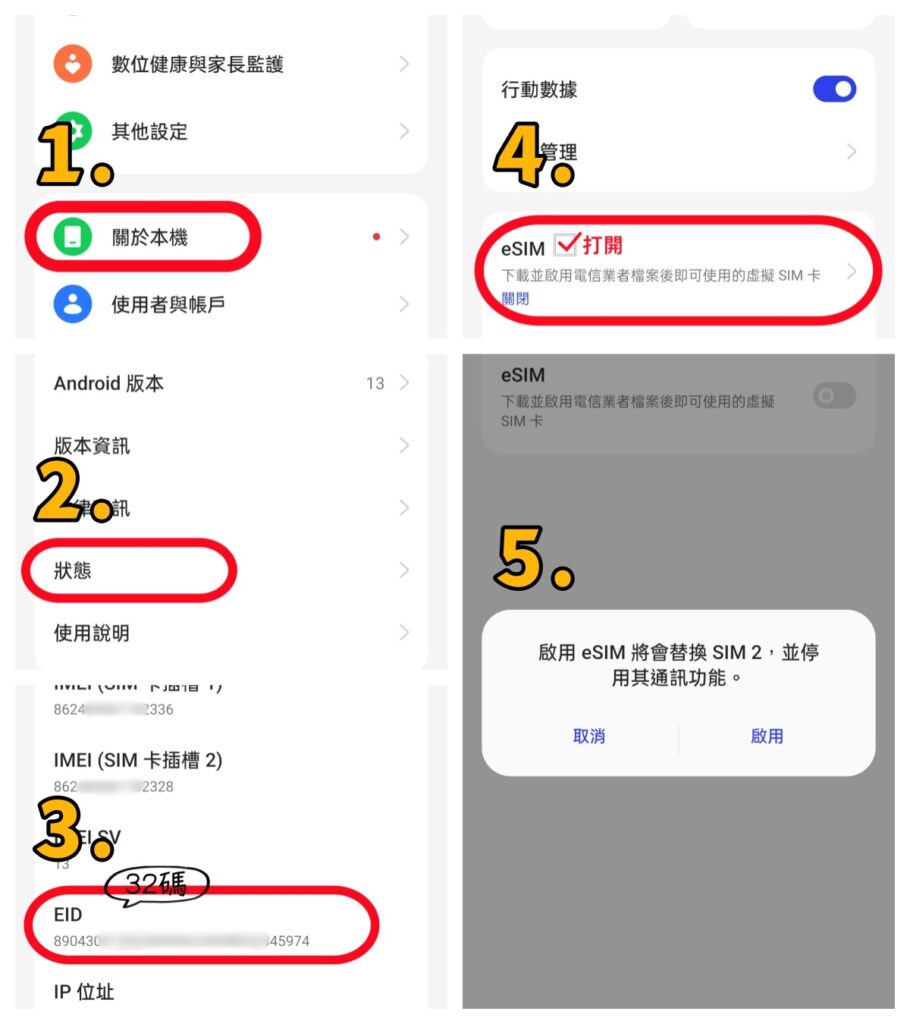
The operation steps may vary depending on the smartphone brand and model. The following example uses OPPO A79.

🔹 Method 1: Check EID through Settings

① Go to 【Settings】 ➔ 【About device】

② Tap 【Status】

③ Check whether an EID (32 digits) is displayed

✅ EID (32 digits) displayed: The phone supports eSIM

❌ No EID displayed: Please purchase a physical SIM card instead

🔹 If there are no 32 digits shown after EID, the eSIM setting is usually disabled. Please follow the steps below to enable eSIM.

④ Go to 【Settings】 ➔ 【Mobile Network】 ➔ Turn on the disabled eSIM ➔ Check that the 32-digit EID appears after EID (as shown in Step ⑤ below)
⚠️ Important Notes

The settings location may vary depending on the Android brand and model. If you cannot find the EID, please search for “EID” or “eSIM” in 【Settings】.

Before purchasing JB Voice eSIM, please confirm that your phone supports eSIM and enter the correct 32-digit EID. If the eSIM cannot be activated or needs to be reissued due to an incorrect EID, a reissuance fee will be charged.

A:
Before using JB Voice eSIM, please make sure that your smartphone meets both of the following requirements:

  • Supports eSIM
  • Is compatible with docomo’s international roaming service

Please note that docomo’s international roaming service has device compatibility limitations. Therefore, even if your smartphone supports eSIM, it does not necessarily mean that JB Voice eSIM will work properly.

If you are not sure whether your smartphone supports eSIM, or whether it is compatible with docomo’s international roaming service, we recommend choosing the JB Voice Physical SIM Card instead.

A physical SIM card does not require eSIM support. As long as your smartphone has a compatible physical SIM card slot, you can use it. You can also borrow a compatible smartphone from a family member or friend to test or verify compatibility in advance, reducing the risk of being unable to use the service due to device compatibility issues.

A: 🌍 You can apply from anywhere in the world, with no specific country restrictions.
JB Voice eSIM/SIM uses the Japanese docomo network and can be used in countries where docomo international roaming services are available.

Before using the service, please check whether your smartphone model is compatible with docomo international roaming.
For details, please refer to: International Roaming Device Compatibility

This product is a service for customers residing outside of Japan.
In accordance with the regulations of the Ministry of Internal Affairs and Communications (MIC), individuals residing in Japan are not eligible to apply for this product (service with a Japanese phone number).

Products

A: Both have the same price and features. The main difference is the type of SIM.

  • JB Voice SIM: A physical SIM card. Your phone must have a SIM card slot, and the SIM card must be inserted into the phone.
  • JB Voice eSIM: An electronic SIM. It is built into the phone, and your phone must support eSIM.
Application

A: Yes.
In accordance with relevant regulations of Japan’s Ministry of Internal Affairs and Communications, when applying for a Japanese phone number, the contract holder must provide proof of their current address in the country that issued their passport for identity and address verification.

The proof of address must include both the contract holder’s name and current address.

  • Driver’s license
  • Family register certificate
  • Tax-related documents issued by a government agency
  • Utility bills (electricity, gas, water, etc.)
  • Credit card or bank statements, etc.

If you would like the eSIM information sent to a hotel in Japan:
Please provide both:
① Hotel reservation confirmation showing the contract holder’s name and stay dates
② Proof of current address

※ eSIM activation information will be sent by email. No physical SIM card will be shipped.

Activation & Usage

A:
JB Voice eSIM activation will be processed between 10:30 AM and 6:30 PM (Japan Time).

After the activation process is completed, docomo will directly send the “Activate eSIM” notification to the device associated with the EID provided during your application.

When the “Activate eSIM” screen appears, please follow the instructions displayed on your device to complete the eSIM installation and activation.

【iPhone Example】
Open:
Settings ➡ Mobile Service (Cellular) ➡ Tap “Activate eSIM”

Then follow the on-screen instructions to complete the setup.

If the “Activate eSIM” screen does not appear automatically:

📩 Please check the eSIM activation email sent by JB Mobile.
📖 Follow the instructions in the operation manual included in the email to complete the eSIM installation and activation.

⚠️ Notes:
・Please use the device with the EID registered during your application.
・Please make sure your device is connected to Wi-Fi or mobile data to complete the eSIM activation process.

Once the verification of your passport + proof of address is completed, we will begin the eSIM activation process.

Activation is usually completed on the same day or the following day, between 10:30 and 18:30 Japan Time (JST).

A: We cannot guarantee successful activation.

A “physical eSIM” is a product that uses a physical SIM card with special technology to provide eSIM-like functionality. It is different from the standard eSIM built into smartphones.

JB Voice eSIM activation requires an EID (32 digits). Depending on the EID’s source, authentication status, or carrier system restrictions, a physical eSIM may encounter an “EID Error” during activation.

Therefore, customers using a physical eSIM may submit an application, but we cannot guarantee successful activation.

⚠️ If activation fails due to an EID-related issue, a reissue fee of ¥2,200 (tax included) will apply.

A: If the eSIM activation is stuck or your Japanese phone number does not appear, please check the following two settings first:

① Select “Voice & Data” for the plan
Do not select “Data Only.”

② Make sure the eSIM is turned on
Go to:
Settings → Cellular/Mobile Service → SIMs → Use “Travel – docomo” → Turn On

After completing these settings, your Japanese phone number should normally appear.

Fees

Fee: JPY 2,200 (tax included)
Breakdown: JPY 2,000 service fee + JPY 200 tax

When do I need to request an eSIM reissue?

  • If you accidentally deleted your eSIM
  • If you changed your smartphone
  • If you need a new eSIM for any other reason

Information required for the application:

  • Your current phone number
  • The EID of your new smartphone (32 digits)
    ※ Please make sure to enter the EID (32 digits) of your new smartphone, not the IMEI or device serial number.
JB Voice SIM
Important Notes Before Purchase

📢 Normal Usage Within Japan ; Compatibility Guide for docomo International Roaming VoLTE Calls

【Warning】If you only intend to use the service for verifying Japanese websites while overseas, please note that Samsung devices, iPhone 16e, Phone 17e/Air, and iPhone 18 series may not work properly overseas.

As 3G networks have been shut down in Japan and many other countries, you must use a VoLTE-compatible phone model to utilize docomo’s international roaming voice call services.

⚠️ Some devices may be completely unable to use the service overseas, while others may only be able to receive SMS and may not be able to make or receive calls.

💡 Actual compatibility may vary depending on the country or region where the device was manufactured.

■ ASUS
Model NameModel NumberRoaming VoLTE CallsRoaming SMSNotes
ASUS ROG Phone 8、ASUS ROG Phone 9〇〇
ASUS ZenFone Max Pro (M2)〇〇
ASUS Zenfone 9AI2202〇〇
■ Google Pixel
Model NameModel NumberRoaming VoLTE CallsRoaming SMSNotes
Global Version〇〇

■ HUAWEI
Model NameModel NumberRoaming VoLTE CallsRoaming SMSNotes
HUAWEI Mate 50 Pro〇〇
■ iPhone
Model NameModel NumberRoaming VoLTE CallsRoaming SMSNotes
16e、17e/Air 、18 SeriesMHRW4ZP/A TW/TH/VN
Global Version(i18)
❌〇Unable to make calls while overseas, but SMS can be received after configuring the APN.
6 、7、X、11、12、13、14、15、16、17 SeriesGlobal Version〇〇
■ OPPO
Model NameModel NumberRoaming VoLTE CallsRoaming SMSNotes
OPPO Reno14 5GCPH2737〇〇
OPPO Reno14 Pro〇〇
OPPO A79 5GCPH2557(Global Version)〇〇
■ Motorola
Model NameModel NumberRoaming VoLTE CallsRoaming SMSNotes
Motorola Edge 60 Fusion〇〇
■ Samsung
Model NameModel NumberRoaming VoLTE CallsRoaming SMSNotes
Samsung Galaxy S SeriesTW、US、HK、SG、AU❌〇
Samsung Galaxy A SeriesTW、US、HK、SG、AU❌〇
■ SHARP
Model NameModel NumberRoaming VoLTE CallsRoaming SMSNotes
AQUOS wish5SH-M32TW〇〇
AQUOS R9SH-M28TW〇〇
■ SONY
Model NameModel NumberRoaming VoLTE CallsRoaming SMSNotes
Xperia 1 VXQ-DQ72 TW/HK〇〇
■ vivo
Model NameModel NumberRoaming VoLTE CallsRoaming SMSNotes
vivo V29 5G、vivo V40 5G、vivo Y55、vivo X300〇〇
■ Xiaomi
Model NameModel NumberRoaming VoLTE CallsRoaming SMSNotes
Redmi 12C、Note 11 Pro+ 5G、Redmi Note 12 Pro+ 5G〇〇Dial*#*#86583#*#* directly to enable or disable the VoLTE calling function.
Xiaomi 12T〇〇
POCO F8 Ultra、POCO X8 Pro Max〇〇
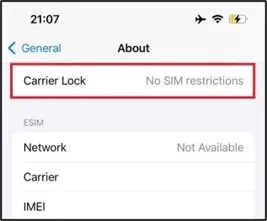
【 iOS Device】

「settings」➔「General」➔「About」➔「Carrier Lock」 ➔No SIM restrictions
【 Android Device】

You cannot determine this directly from the mobile phone. Please check with the place of purchase or the carrier you have a contract with.
SIM lock regulations vary by country. In Taiwan, most phones are not SIM-locked.Devices purchased in countries like Japan or the United States are more likely to have SIM lock issues.
📢If you have used SIM cards from different countries or carriers, the device is likely not SIM-locked.
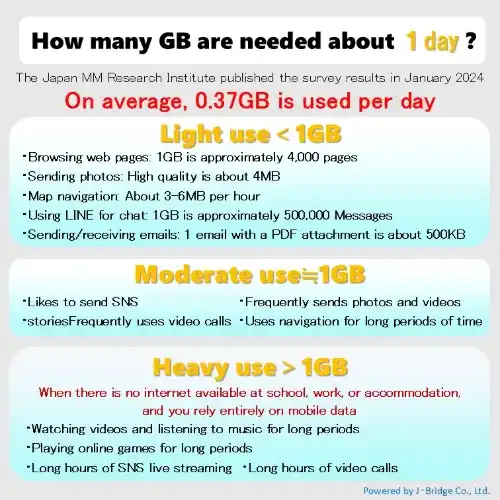
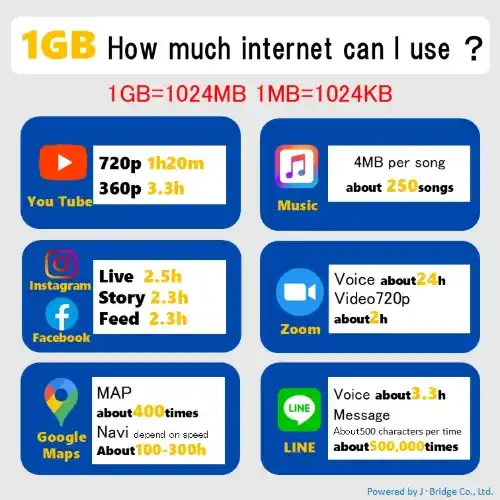
🅰️ No. JB Voice SIM does not incur any additional data charges, whether you use it in Japan or overseas.

🗾 Use in Japan

📶 Mobile data service is available in Japan.
・You will receive high-speed data according to your subscribed plan(1GB–50GB).
・After your high-speed data allowance is used up, your connection will not be disconnected. The speed will automatically be reduced to 200kbps, and you can continue using the internet.
💬 Examples:
LINE text messages, emails, and simple web browsing can still be used.

📢 Internet Settings in Japan
After arriving in Japan:
🍎 iPhone: You need to download the Configuration Profile.
🤖 Android: You need to configure the APN settings.

🌐 Overseas Roaming (Countries Outside Japan)

📞 Outside Japan, only the following services are available:
✅ Voice Calls and SMS
❌ Mobile data (internet access) is not available overseas.

Therefore:
・Whether mobile data is turned ON or OFF
・Whether you are connected to Wi-Fi or not

No international data roaming charges will occur.

📢 How to Use Overseas

After receiving the SIM card overseas:
Simply insert the SIM card into your smartphone to use voice calls and SMS.
❌ Do not download the Configuration Profile.
❌ Do not configure the APN settings.
This prevents your smartphone from attempting to establish mobile data communication.

A: 🌍 You can apply from anywhere in the world, with no specific country restrictions.
JB Voice eSIM/SIM uses the Japanese docomo network and can be used in countries where docomo international roaming services are available.

Before using the service, please check whether your smartphone model is compatible with docomo international roaming.
For details, please refer to: International Roaming Device Compatibility

This product is a service for customers residing outside of Japan.
In accordance with the regulations of the Ministry of Internal Affairs and Communications (MIC), individuals residing in Japan are not eligible to apply for this product (service with a Japanese phone number).

Product Features

🅰️With JB voice SIM, you cannot choose your phone number. The phone number will start with 080 or 070.

If your SIM card is lost or stolen, please contact our customer service as soon as possible to request a temporary suspension and prevent unauthorized use.

LINE Official Account ID: @jbmobile

📌 If You Find Your SIM Card Later

If your SIM card is recovered, you may contact us to request reactivation.

📌 We Also Recommend

Please report the loss to the local police to help protect your rights and prevent misuse.

📌 SIM Card Replacement

• Processing time: Approximately 5 business days

• Replacement fee: JPY 3,000 (tax excluded)

📌 Information Required for a Replacement Request

• Contract phone number
• Subscriber’s name
• Subscriber’s email address

🅰️ Yes!

You can make free emergency calls in Japan using the following numbers:

  • 110 — Police 👮
  • 118 — Japan Coast Guard 🚢
  • 119 — Fire Department / Ambulance 🚑

🅰️ You can make calls to toll-free numbers such as 0120 and 0800.
🅰️ International calls are not available. Please use internet calling services such as LINE for international calls.

🅰️ This benefit applies only when using the service within Japan.

  • The first 5 minutes of each voice call made within Japan are free.
  • Calls longer than 5 minutes will be charged at the standard voice call rate.

⚠️ This benefit does not apply when using the service overseas. Calls made abroad are charged according to international roaming rates.

🅰️ 3-in-1 SIM cards (nano, micro, standard).
There are notches around the IC chip for nano, micro, and standard sizes. Use your finger to push out the required size from the back.
Be sure to handle the IC chip carefully when removing it to avoid damaging it.

Application & Shipping

In accordance with the regulations of Japan’s Ministry of Internal Affairs and Communications (MIC), applicants for a Japanese phone number are required to submit their passport and proof of their current residential address.

<eSIM will be delivered by email>
<Physical SIM cards can only be shipped to the address shown on the proof of address>

■ Proof of Current Residential Address
Please provide **one** of the following documents showing **both the subscriber’s name and current residential address:
・Driver’s license, certificate of residence, or a tax-related document issued by a government authority
・Utility bill (Electricity bills / Gas bills / Water bills / Telephone bills, etc.)
・Credit card statement or bank statement, etc.

■ If you would like the SIM card to be delivered to a hotel in Japan, please provide **both** of the following:
1. Hotel reservation confirmation showing the subscriber’s name and check-in date
2. Proof of current residential address
※ Shipping to Japan forwarding services or relatives’/friends’ addresses is not allowed

The shipping time will be calculated from the date when payment is completed and passport eKYC + address verification are approved.

📦 Shipping Time
• 1GB / JPY 1,210 plan (voice charges charged separately): Ships on the 2nd business day
• Other plans: Ships within 3–5 business days

✈️ EMS International Shipping (after shipment)
• Taiwan: Approximately 3 days for delivery
• Hong Kong / Macau / Singapore: Approximately 4 days for delivery
• Other countries: Approximately 5–7 days for delivery

📌 Example
If the order is shipped on May 1, it is expected to arrive in Taiwan around May 4.

⏰ You may choose your preferred delivery time slot.

・Morning (8:00 AM – 12:00 PM)
・2:00 PM – 4:00 PM
・4:00 PM – 6:00 PM
・6:00 PM – 8:00 PM
・7:00 PM – 9:00 PM
・No Preferred Time Slot

① Choose Your Plan

🌍 Overseas Use (International Roaming)

📞 Available:
Voice Calls & SMS

❌ Mobile data (internet access) is not available outside Japan.

📎 User Guide:
JB Voice SIM International Roaming

Since mobile data is not provided outside Japan, no international data roaming charges will be incurred.


🇯🇵 Use in Japan

📞 Voice Calls

💬 SMS

📶 Mobile Data (Japan only)

After your data allowance is used up, you can continue using the service at 200 kbps.

Monthly Plans

・1GB:¥1,210

・5GB:¥1,980

・10GB:¥2,420

・20GB:¥3,850

・50GB:¥4,730

② Identity Verification

Please complete the following:

✅ Passport Verification

✅ Proof of Current Address

In accordance with the regulations of Japan’s Ministry of Internal Affairs and Communications, applicants for a Japanese phone number are required to submit a document that verifies their current residential address in the country that issued their passport.

Physical SIM cards can only be delivered to the address shown on the proof of address.

Please provide one of the following documents showing both your name and current address:

・Driver’s license, family register certificate, or government-issued tax document

・Utility bill (electricity, gas, water, etc.)

・Credit card statement or bank statement

If you would like the SIM card delivered to a hotel in Japan, please also provide:

① Hotel reservation confirmation (showing your name and check-in date)

② Proof of current address

📌 Verification Hours (Japan Time)

Weekdays: 10:00 AM – 6:00 PM

The verification result will be sent from biz@jbrg.jp.

③ Shipping

Shipping will be arranged after your documents have been approved.

📦 Estimated Shipping Time

・1GB Plan: Approximately 2 business days

・5GB–50GB Plans: Approximately 3–5 business days

📩 A tracking number will be provided after shipment.

EMS:
https://trackings.post.japanpost.jp/services/srv/search/input

Yamato Transport:
https://toi.kuronekoyamato.co.jp/cgi-bin/tneko

④ After Receiving Your SIM Card

・Voice Calls & SMS

Simply insert the SIM card and start using it (both in Japan and overseas).

・Mobile Data in Japan

Configure the APN after arriving in Japan.

⚠️ Do not configure the APN while outside Japan.

⑤ Billing & Payment

・First Invoice

The first invoice will be sent approximately 2 business days after shipment.

You must complete the credit card automatic payment setup.

・Monthly Invoices

Invoices for the following month are sent on the 20th of each month.

Automatic payment will be processed on the 1st of each month.

・Additional Charges

Charges for voice calls and other services will be billed separately and automatically charged together with a future monthly invoice.

⑥ Cancellation

・Please go to My Account and complete the Cancellation Form to submit your cancellation request.

・If you cancel within the first 3 months, a JPY 3,850 cancellation fee will apply.

・After 3 months of service, you may cancel at any time without a cancellation fee.

・If your cancellation request is completed by the 15th of the month, your service will be terminated at the end of that month.

🅰️ Yes! We offer both domestic shipping within Japan and international shipping.

🚚 Domestic Shipping (Japan)

Orders within Japan are shipped via Yamato Transport, and shipping is free.

🌏 International Shipping

International orders are shipped via EMS (Express Mail Service). Shipping fees vary depending on the destination.

  • ¥1,450 — Zone 1 (China, South Korea, Taiwan)
  • ¥1,900 — Zone 2 (Other Asian countries and regions)
  • ¥3,150 — Zone 3 (Oceania, Canada, Mexico, the Middle East, and Europe)
  • ¥3,900 — Zone 4 (United States, including overseas territories such as Guam)
  • ¥3,600 — Zone 5 (Central & South America excluding Mexico, and Africa)

⚠️ Actual delivery times and available destinations are subject to the latest EMS service coverage and local postal conditions.

Monthly Fees, Call Charges & Cancellation
① First Invoice

・Sent 2 business days after your scheduled delivery date (service activation date) from payment@jbrg.jp.
・Includes the first month’s monthly service fee.
・You must complete the credit card auto-payment setup at the same time.
・You may change your registered credit card for automatic payment at a later time.

② Monthly Invoices (From the Second Invoice Onward)

・An invoice for the following month will be sent on the 20th of each month.
・Example: Invoice sent on April 20 → for the May monthly fee.
・The monthly service fee will be automatically charged on the 1st of each month.

③ Additional Charges (Calls, SMS, etc.)

・A statement for additional charges will be sent on the 20th of the month after next following the month of usage.
・Example: Charges incurred in January → Statement sent on March 20.
・These charges will be automatically charged together with the corresponding monthly service fee.

📌 Cancellation Information

To cancel your service, please go to My Account and complete the Cancellation Form

🔹 If you cancel within the first 3 months of use, a cancellation fee of JPY 3,850 will apply.

🔹 After 3 months of use, you may cancel at any time without a cancellation fee.

🔹 If the cancellation request is completed by the 15th of each month, the cancellation will take effect within the same month.

📌 About Keeping Your Phone Number

If you cancel the service and apply again in the future, a new phone number will be assigned by the system.

Therefore, we cannot guarantee that you will receive the same phone number again.

📌 JB eSIM / JB SIM Card
If we have not yet sent the eSIM activation URL or the physical SIM card has not yet been shipped, you may request order cancellation and a refund.

To cancel your order, please contact our customer support through our official LINE account (@913athnc) and provide the following information:

• Order number
• Customer name
• Customer email address

If you are unable to use LINE, you can also contact us via Email (info@jbrg.jp).

📢 Refund Information
• For cancellations due to customer reasons, a 5% credit card transaction fee will be deducted from the refund amount.
• For cancellations due to reasons caused by our company, a full refund will be issued.

📌 JB Voice SIM / JB Voice eSIM
Since the application process for a Japanese phone number begins immediately after the order is completed, cancellations and refunds are generally not available.

If you have special circumstances, please contact us through our official LINE account. We will review your case and assist you accordingly.

🅰️Yes, it is possible to extend the expiration date. Please purchase a JB Voice Card extension plan in one-month increments.

Please follow the steps below to update your credit card information.

  1. Visit the JB Mobile homepage:
    https://jbmobile.jp/en/
  2. Log in to My Account.
  3. Select Stripe Billing Management from the left-side menu.
  4. Log in with your email address. You will be redirected to the Stripe page, where you can update your credit card information.

※ After the update is completed, the new credit card information will be used for future payments.

International Roaming & Authentication

🅰️ Once you receive your SIM card, you can use international roaming for voice calls and SMS while outside Japan.

📌 How to Use
✔ Simply insert the SIM card to use voice calls and SMS via international roaming.
❌ Mobile data (internet access) is not available outside Japan.

・For iPhone: Do not install a Configuration Profile.
・For Android: Do not configure the APN settings.

⚠️ Important Notes
・🛜 Turning Wi-Fi or 📶 Mobile Data on or off does not affect voice calls or SMS while roaming.
・💰 Since this SIM does not provide mobile data outside Japan, no international data roaming charges will be incurred.

🅰️ Yes, it is possible.

This product uses a genuine docomo mobile phone number, not an IP phone number.
Therefore, as long as you can access and log in to Japanese websites from overseas, you can complete phone call and SMS verification normally.

✅ Make and receive calls
✅ Send and receive SMS messages

🅰️ Yes, it is possible!
Even when you are overseas (such as Taiwan), you can complete the verification by using international roaming to make a call to the Japanese phone number.

How to dial:
・Enter “+81” (Japan country code)
・Remove the first “0” from the phone number

Example:
050-1234-5678
➡️ +81 50-1234-5678

✅ When verification is successful, the call usually rings for 1–3 times and then automatically disconnects. The verification page will also proceed to the next step.

💰 Calls made from overseas to Japan may incur international roaming call charges according to your mobile carrier’s rates.

⚠️ If verification cannot be completed, please check the following:
・Make sure +81 is entered correctly
・Make sure the initial 0 has been removed from the phone number
・Confirm that your smartphone supports international calling and VoLTE functionality

🅰️ Yes, charges may apply.
If you receive a Lawson Ticket verification call outside Japan, international call charges may be incurred.

📞 Fee Information
  • Taiwan / Hong Kong / Macau: approximately JPY 174 per minute
    (Actual charges depend on your mobile carrier.)
  • Receiving the call within Japan: No charge
⏱️ Verification Call Duration
  • The call usually lasts only a few seconds to several tens of seconds and normally does not exceed 1 minute.
  • The verification code is provided through a Japanese voice message, so we recommend familiarizing yourself with how Japanese numbers are pronounced in advance.
📝 Registration Notes

Based on current testing, registering directly from Taiwan may sometimes fail.

A successful method that has been confirmed is to have the registration process completed with assistance from Japan, then receive the verification call in Taiwan and enter the verification code to complete the verification process.

🅰️ If your phone connects only to a GSM (2G) network while roaming, voice calls and mobile data may not work properly.

📶 Please check the current network type on your device.

✅ LTE / 4G / 5G — Normal service is available.
⚠️ GSM (2G) — Some countries have discontinued 2G service, which may affect voice calls or mobile data.

🍎 iPhone

Open the Phone app and dial *3001#12345#* to check your current network type.

💡 Field Test Mode is a built-in iPhone feature and does not incur any additional charges.

🤖 Android

Check the status bar at the top of your screen. If you see 4G, LTE, or 5G, your device is connected to a supported network.

🅰️ Yes!

JB Voice SIM uses docomo’s international roaming service, so voice calls and SMS may be available while you’re in Hong Kong.

📶 The following mobile operators in Hong Kong may support VoLTE roaming:

  • CMHK (China Mobile Hong Kong)
  • CSL
  • 3 Hong Kong (Three)

⚠️ Actual availability may vary depending on several factors, including:

  • Your phone model
  • Whether VoLTE is supported and enabled on your device
  • The local mobile operator’s network conditions

We recommend confirming that your device supports VoLTE roaming before your trip for the best experience.

Please note that network environments may change over time, and actual connectivity depends on the services provided by the local mobile operator.

How to Use in Japan
【 iOS Device】

🌸View Used Mobile Data
“Settings” ➔ “Cellular”
➔ “Current Period” shows the total mobile data usage for the current period.
Scroll down to see the mobile data usage for individual apps.
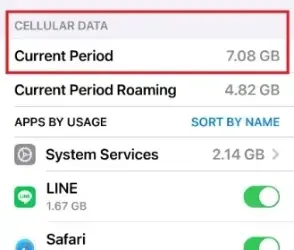
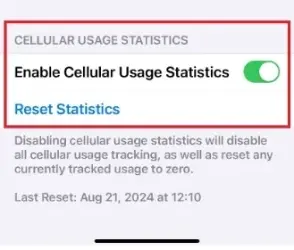
🌸Reset Statistics Before Viewing
“Settings” ➔ “Cellular”➔ scroll to “Reset Statistics” to reset the mobile data usage for the “Current Period” to 0. 📢If you want to view the mobile data usage for a different SIM, please first switch the “Cellular Data” SIM.
【 Android Device】

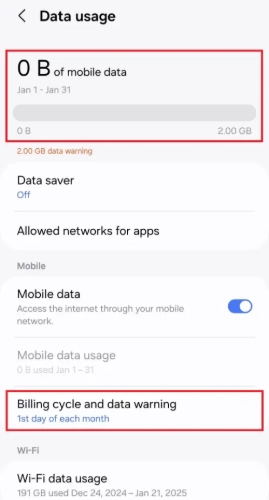
The Android system may have different screens and operation methods depending on the brand and model. Here, we will explain how to check mobile data usage using the Galaxy A55 as an example.

🌸View Data Usage
“Settings”➔”Connections”➔”Data usage”
You can view the total amount of mobile data used in the current billing cycle.
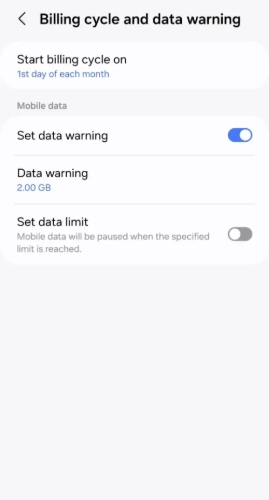
🌸Set Billing Cycle Before Viewing Statistics
“Settings”➔”Connections”➔”Data usage”➔”Billing cycle and data warning”➔to reset the mobile data usage statistics.
Yes, you can use this service if the following conditions are met:

✅ Your smartphone is connected to Wi-Fi
✅ The Wi-Fi Calling function is enabled
✅ You are using a supported device (iPhone / Android)
✅ Your SIM card remains active (not suspended or cancelled)

💰 Charges (Important)
Wi-Fi Calling is treated as if you are using the service in Taiwan.

📞 Making calls
・Calling a Taiwan number → Taiwan domestic call charges
・Calling a Taiwan mobile number → Taiwan domestic rates
・Calling overseas (e.g., Japan) → International call charges

👉 No international roaming charges will apply

📲 Receiving calls
・Receiving calls from Taiwan → Free (same as receiving calls in Taiwan)

🌟 Benefits
・Good call quality when the Wi-Fi connection is stable
・You can make and receive calls without enabling international roaming

🅰️ Once you arrive in Japan, you can use the following services:

📞 Voice calls
💬 SMS (Text Messages)
🌐 Mobile data (1–50GB)

All of the above services are available for normal use.

📶 How Do I Use Mobile Data?

Before using mobile data for the first time, you need to complete a simple setup.

🤖 Android

  • Manually configure the APN settings.

🍎 iPhone

  • Download and install the configuration profile.

Once the setup is complete, you can use mobile data in Japan. Voice calls and SMS will also work normally.

📖 For detailed setup instructions, please refer to the user guide included with your SIM card.

🅰️ Yes! No additional application or activation is required. 😊

All JB SIM and JB eSIM products support Personal Hotspot at no extra charge.

⚠️ Before using Personal Hotspot, you must configure the Personal Hotspot APN settings. Otherwise, you won’t be able to share your mobile data connection with other devices.

🅰️ To share your mobile data connection with a computer, tablet, or other devices using Personal Hotspot, you must first configure the APN settings.


🍎 iPhone (iOS)
📱 Single SIM

Settings ➡ Cellular ➡ Cellular Data Network

Enter the following information under both Cellular Data and Personal Hotspot:

✔ APN
✔ Username
✔ Password


📱 Dual SIM / Multiple SIMs

Settings ➡ Cellular ➡ Select the SIM you want to configure ➡ Cellular Data Network

Enter the following information under both Cellular Data and Personal Hotspot:

✔ APN
✔ Username
✔ Password

⚠️ Each SIM has its own APN settings. Be sure to select the correct SIM before making any changes.

⚠️ In most cases, you should configure the SIM currently selected for Cellular Data.


✅ After the APN is configured

A Personal Hotspot option will appear in Settings.

Turn on:

✔ Allow Others to Join

We also recommend changing your Wi-Fi password before sharing your connection.

📌 To check your Wi-Fi (device) name:

Settings ➡ General ➡ About ➡ Name


🤖 Android

For Android devices, whether you are using an eSIM or a physical SIM card, you must configure the APN before you can access mobile data or use the Personal Hotspot feature.

Using Samsung as an example:

Settings ➡ Connections ➡ Mobile Networks ➡ Access Point Names (APN) ➡ Tap + (Add)

Enter the APN information provided with your SIM:

✔ APN
✔ Username
✔ Password

Save the settings when finished. You can then use mobile data and the Personal Hotspot feature.

⚠️ The menu layout may vary depending on the Android brand and model, but the setup process is generally the same.

🍎 iPhone (iOS)

📌 Turn on Personal Hotspot:
【Settings】 ➡ 【Personal Hotspot】 ➡ Turn on 【Allow Others to Join】
You can then share your mobile data connection with other devices.

📌 Change Wi-Fi Password:
【Settings】 ➡ 【Personal Hotspot】 ➡ 【Wi-Fi Password】
Enter a new password and save the settings.

📌 View or Change Wi-Fi Name:
【Settings】 ➡ 【General】 ➡ 【About】 ➡ 【Name】

This device name will be displayed as the Wi-Fi hotspot name when other devices search for available networks.


🤖 Android

※ The operation interface may vary depending on the brand and model. The following example uses Samsung A55.

📌 Turn on Personal Hotspot:
【Settings】 ➡ 【Connections】 ➡ 【Mobile Hotspot and Tethering】 ➡ Turn on 【Mobile Hotspot】

You can then share your mobile data connection with other devices.

📌 Change Wi-Fi Name or Password:
【Settings】 ➡ 【Connections】 ➡ 【Mobile Hotspot and Tethering】 ➡ 【Mobile Hotspot】

📌 Tap 【Network Name】 or 【Password】
to enter the settings page and modify the hotspot name and password.

🅰️ Please check the following items first:

① Confirm that the APN is set for the correct SIM/eSIM

If your phone uses multiple SIM cards or eSIMs at the same time, the most common issue is that the APN was set for the wrong SIM card.

Please confirm that the SIM/eSIM currently used for Mobile Data is the same SIM/eSIM where the APN settings were entered.


② Restart your device after completing the settings

After completing the APN settings, please restart your phone once and test the Personal Hotspot function again.


③ Recheck the APN information

Please carefully verify the following information:

✔ APN
✔ Username
✔ Password

Make sure all settings exactly match the information provided in the instruction manual.


⚠️ Important Notes

Due to the wide variety of smartphone brands, models, and operating system versions, the settings screens may differ depending on the device. Therefore, we cannot guarantee that the Personal Hotspot function will work on every device.

However, as of now, we have not received any cases where the Personal Hotspot function could not be used due to an issue with the JB SIM/eSIM itself.

🅰️ Yes, you can.
We recommend completing the APN settings before departure, so you can use the Personal Hotspot function immediately after arriving in Japan.

⚠️ However, our SIM/eSIM products use Japanese local mobile networks and are not international roaming products. Therefore, they cannot connect to the Japanese Docomo network while you are outside Japan. Even if the APN settings have been completed, you will not be able to confirm whether the settings are successful or test the Personal Hotspot function overseas.

📌 In short:
✔ You can set up the APN before traveling.
✔ You can use it after arriving in Japan.
❌ You cannot test whether the APN settings are working while outside Japan.

This is a normal situation. Please test the connection after arriving in Japan and connecting to the mobile network.

◆ Turn off background app refresh using mobile data
Go to “Settings” → “General” → “Background App Refresh”
Since most apps don’t need real-time updates, it’s recommended to set this to “Wi-Fi” so mobile data isn’t used.

◆ Turn off “Wi-Fi Assist”
Go to “Settings” → “Cellular” → Turn off “Wi-Fi Assist.” When Wi-Fi connection is poor, the system won’t automatically use mobile data.

◆ Turn off mobile data for iCloud backup
Go to “Settings” → “Cellular” → “iCloud Backup,” and turn it off so mobile data won’t be used for automatic iCloud backups.

◆ Enable “Data Saver” mode
Tap your profile picture in the YouTube app → Go to Settings → Video quality preferences → Under Mobile networks, select Data saver.

◆ Adjust “Video Quality Preferences”
Open the YouTube app → Tap your profile picture → Settings → Video quality preferences → For Mobile networks, choose Data saver (e.g., 480p or lower).

◆ Turn off “Autoplay next video”
Tap your profile picture → Settings → Playback → Toggle off Autoplay next video.
This prevents continuous playback in case you fall asleep or forget to stop the video.

◆ Limit video preloading while browsing your feed
Tap your profile picture → Settings → Playback → Set Play videos in feeds to Off or Wi-Fi only.

◆ Turn off mobile data usage for the YouTube app
For iPhone:
Go to Settings → Mobile Data → Find YouTube → Toggle off to disable mobile data usage.

For Android:
Go to Settings → Apps → YouTube → Mobile data & Wi-Fi → Turn off Allow background data usage.

◆Stop videos from auto-playing in your Facebook news feed
https://www.facebook.com/help/1406493312950827/?helpref=uf_share

◆Adjust the number of photos you want to see to control the data usage and loading speed on Facebook.
https://www.facebook.com/help/mobile-basic/656932384361200/

<Quoted from Facebook>

① Enable “Data Saver Mode”

Instagram App → Profile →【Settings and privacy】→【Data usage and media quality】

📌 Turn on “Use Less Mobile Data”
📌 This reduces video preloading and the loading of high-quality photos/videos.


② Limit Media Quality and Preloading

Instagram App →【Settings and privacy】→【Media quality】

📌 Recommended settings:

✔ High-quality media → Set to “Wi-Fi only” or turn off
✔ Video preloading → Limit or turn off (if available on your device)

📌 Prevents large amounts of video content from loading automatically while scrolling.


③ Turn Off Background Mobile Data (iPhone)

【Settings】→【Cellular】→【Instagram】

📌 Turn off mobile data access or limit background activity.
📌 Prevents the app from continuously using data in the background.


④ Threads (Same Account System)

Threads uses the same Meta system settings as Instagram.

📌 Recommended settings:

✔ Enable “Use Less Mobile Data”
✔ Limit high-quality media
✔ Turn off background data usage

Activation & Usage

✅ Basic Usage (Voice Calls / SMS)

Simply insert the SIM card into your smartphone, and you can immediately use voice calls and SMS!

Your smartphone will automatically display your Japanese phone number, making it very convenient 👍

📞 Voice Call & SMS Settings

If you only use voice calls and SMS after inserting the SIM card:

You do not need to connect to Wi-Fi.
You do not need to configure mobile data settings.

📶 Mobile Data Settings (For Use in Japan)

If you want to use mobile data:

iPhone: You need to download the configuration profile.

Android: You need to manually configure the APN settings.

🅰️ Yes, you can use them together.

You can use JB Voice SIM and Wi-Fi at the same time depending on your needs.

・Use Wi-Fi for internet access
・Use the SIM card for voice calls and SMS

Flexible and convenient!

The default settings are as follows:

Network Password: 1234
PIN Code: 0000

⚠️ We recommend changing the password according to your needs after use to improve security.

Taiwan’s major mobile carriers provide Wi-Fi Calling services.

➡ While you are in Japan, Wi-Fi Calling is treated as if you were using your phone in Taiwan.

📲 Receiving calls and SMS: Free

📲 Making calls and sending SMS: Charged at your Taiwan domestic rates

📶 Requirements

・Your phone is connected to Wi-Fi.

・Wi-Fi Calling is enabled on your phone (please refer to the attached guide).

・Your Taiwan SIM card is active.
(No international roaming subscription is required, so you don’t need to worry about additional roaming charges.)

📞 How to Make Calls

Calling a Taiwan number

➡ Dial the Taiwan phone number directly without adding the country code.

Calling a Japan number

➡ Make an international call.
(Example: 009-81-…)

🌟 Benefits

・No need to enable international roaming.

・You can make and receive calls over Wi-Fi even in areas with poor mobile signal, such as indoors.

・The person you’re calling will not know that you’re overseas.

・You can also receive SMS verification codes while abroad.

🅰️ Yes. You can start using your SIM card as soon as you receive it.

📌 Service Start Date
・For SIM cards delivered by mail, the contract starts on the actual delivery date.
・Due to international shipping, your SIM card may arrive before your scheduled service start date. If it arrives early, you may use it immediately.
📌 Monthly Subscription Fee
・The billing cycle runs from the 1st to the last day of each month.
・Monthly subscription fees are not prorated. (Even if your service starts in the middle of the month, the full monthly fee applies.)
📌 Charges Before the Service Start Date
You may start using your SIM card immediately after receiving it, without waiting for the service start date.

The following charges may apply between the day you receive your SIM card and your service start date:

① Data usage charges (according to your subscribed plan)
② Voice call charges (based on actual usage)
③ SMS charges (if applicable)

⚠️ No monthly subscription fee will be charged during this period. The monthly subscription fee begins on your service start date.

Examples:
・Service start date: May 1 / SIM received: April 29
➡️ You may start using the SIM on April 29. The monthly subscription fee begins in May.
・Service start date: May 15 / SIM received: May 13
➡️ You may start using the SIM on May 13. The full monthly subscription fee for May still applies.

📴 3G services have been discontinued, and international roaming voice calls now require VoLTE (4G voice calling) support.

⚠️ If your phone does not support VoLTE or VoLTE is not enabled, you may experience issues such as:

  • Unable to make calls
  • Unable to receive calls
  • Problems using voice calls while roaming overseas

Before traveling abroad, please confirm that your device supports VoLTE and that the feature is enabled to ensure normal voice call service while roaming.

🅰️ Since JB voice SIM does not offer an online real-time data usage query service, please use the statistics function on your smartphone or tablet device. Please refer to the “How to check your mobile data usage” in the common questions of the JB series.

🅰️After updating to iOS 17, there may occasionally be an issue where the signal bars do not display the signal strength, but this does not affect reception. You can try the following methods:

  • Restart the iPhone
  • Toggle Airplane Mode on and off
  • Turn mobile data off and on
  • Check for software updates
① When You Receive Your SIM Card

Simply insert the SIM card into your phone to start using:
📞 Voice Calls
📨 SMS

✔ Wi-Fi and Mobile Data settings do not affect voice or SMS service.

② Do NOT Configure APN Outside Japan (Important)

❌ iPhone: No configuration profile is required.
❌ Android: No APN setup is required.

📍 APN settings are only required when using mobile data (1–50GB) in Japan.

③ Dual SIM Settings

If your phone has two SIM cards:

✔ Select the SIM you want to use for mobile data.
✔ It is recommended to turn off Automatic Mobile Data Switching.

👉 This prevents your phone from switching to the SIM that cannot access the internet.

④ If the SIM Doesn’t Work

Please try the following first:

1️⃣ Update your phone to the latest system version (VoLTE support is required).
2️⃣ Remove any APN settings (do not configure APN outside Japan).
3️⃣ Turn Airplane Mode on and off to reconnect to the network.
4️⃣ Restart your phone.

⑤ Still Not Working?

👉 Please test the SIM card in another phone (your spare phone or a friend’s phone).

✔ Works in another phone → The issue is with your phone settings.
✔ Doesn’t work in any phone → The SIM card may be defective (we can arrange a replacement).
✔ If the issue is due to device compatibility → We can assist with a return or refund.

📌 JB eSIM
Since the eSIM activation time can be determined by the customer, we recommend completing the eSIM issuance process after confirming that your flight will depart as scheduled.

• eSIM not yet issued: You can keep it and use it at a later time.
• Activation URL deleted: You can request a new Activation URL through our official LINE account.

📌 JB SIM Card
As long as the SIM card has not been inserted into a device and has not connected to the Japanese Docomo network, it will not be activated and can be kept for your next trip to Japan.

📌 JB Voice SIM / eSIM
Since the Japanese phone number application process begins immediately after the order is submitted, cancellations or refunds are generally not available once the application has been completed.

If you are unable to travel to Japan due to a flight cancellation, please contact us through our official LINE account. We will assist you in confirming the available options and provide further support.

If you are unable to complete activation immediately after arriving in Japan, please connect to the airport’s free Wi-Fi first and contact our customer support. We will assist you in checking your settings and activation status.

• New Chitose Airport
https://www.new-chitose-airport.jp/ja/service/internet_fax_copy/lan/

• Hakodate Airport
https://www.airport.ne.jp/facility/wifi/

• Sendai Airport
https://www.sendai-airport.co.jp/service/wifi.html

• Narita International Airport
https://www.narita-airport.jp/jp/service/svc_33_wire

• Haneda Airport
https://tokyo-haneda.com/service/facilities/wireless_lan.html

• Chubu Centrair International Airport
https://www.centrair.jp/service/wireless-lan.html

• Kansai International Airport
https://www.kansai-airport.or.jp/service/internet/06.html

• Fukuoka Airport
https://www.fukuoka-airport.jp/service/wifi01.html

• Aso Kumamoto Airport
https://www.kumamoto-airport.co.jp/facilities/kumamoto-free-wi-fi/

• Naha Airport
https://www.naha-airport.co.jp/service/wifi/wifi-spot/

📌 Recommendation
Before departure, please save screenshots of our customer support contact information and your order details so that you can quickly receive assistance after arriving in Japan.

Yes, you can.

As long as your SIM/eSIM is still within the validity period, you can continue using it when you re-enter Japan, even if you temporarily leave Japan.

📌 After returning to Japan:
• Turn on Mobile Data
• Switch Mobile Data to the JB SIM/eSIM
• Wait for your phone to reconnect to the Japanese mobile network

There is no need to apply again or reinstall the SIM/eSIM. It can be used normally as long as it remains within the validity period.

To avoid accidentally using your original SIM and incurring international roaming charges, please follow the settings below:

📌 Basic Settings
• Switch Mobile Data to the SIM/eSIM you use in Japan.
• Turn off the “Allow Mobile Data Switching” function.
• This prevents your device from automatically using your original SIM for internet access.

📌 SMS Information
• You can continue to receive Taiwan SMS messages normally (usually free of charge).
• SMS charges from other countries depend on the regulations of your original mobile carrier.

📌 To completely avoid roaming charges, you can turn off your original SIM:

【iOS Devices】
Settings → Cellular → Select your original SIM → Turn off “Turn On This Line”

【Android Devices】
Settings → Connections → SIM Card Manager → Select your original SIM → Turn off

📌 Recommendation
If you do not need to use your original phone number, we recommend turning off your original SIM completely to prevent any accidental roaming charges.

Yes. You can receive Taiwan SMS messages (including verification codes) for free while in Japan.

📌 Explanation:
• Taiwan mobile numbers (such as Chunghwa Telecom / Taiwan Mobile) can still receive SMS messages while you are in Japan.
• Even without applying for international roaming, SMS reception usually works as long as the SIM card remains active.
• Receiving SMS messages generally does not incur any charges (actual conditions may vary depending on your mobile carrier).

📌 Dual SIM Settings (for both Android and iPhone):
• Keep both your original SIM (Taiwan number) and JB SIM enabled at the same time.
• For calls and SMS, we recommend keeping your original SIM (SIM1).
• Switch mobile data to the JB SIM (SIM2) for internet access.
• The same settings apply when using eSIM, allowing both SIMs to be used simultaneously.

📌 Recommendation:
• Switch mobile data to the JB SIM after arriving in Japan.
• This helps prevent accidental roaming charges from using mobile data on your original SIM.

 Online Customer Service

Stay Worry-Free in Japan with Local Emergency Support
📩Email biz@jbrg.jp