
FAQ Category JB Voice eSIM

How to Check if Your Phone Supports eSIM & Find Your EID

【iPhone (iOS)】

🔹 Method 1: Check Your EID in Settings

Settings ➔ General ➔ About ➔ Find EID

✅ If a 32-digit EID is displayed: Your iPhone supports eSIM.

🔹 Method 2: Check via the Dial Pad

Dial: *#06#

The Device Information screen will appear:

✅ If an EID is displayed: Your iPhone supports eSIM.
➔ If only the IMEI is displayed: Please purchase a physical SIM card instead.

※ Some iPhone models purchased in China, Hong Kong, or Macau may not support eSIM. Please check your device model before purchasing.

【Android Devices】

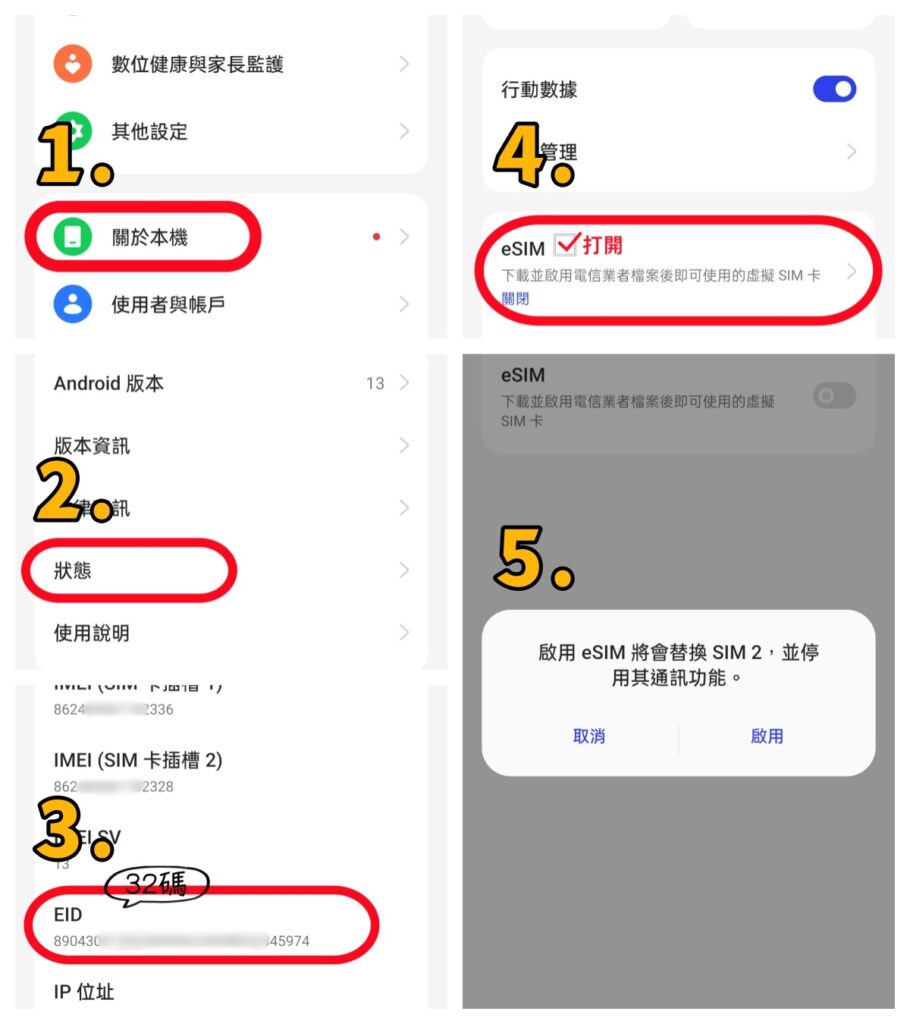
The operation steps may vary depending on the smartphone brand and model. The following example uses OPPO A79.

🔹 Method 1: Check EID through Settings

① Go to 【Settings】 ➔ 【About device】

② Tap 【Status】

③ Check whether an EID (32 digits) is displayed

✅ EID (32 digits) displayed: The phone supports eSIM

❌ No EID displayed: Please purchase a physical SIM card instead

🔹 If there are no 32 digits shown after EID, the eSIM setting is usually disabled. Please follow the steps below to enable eSIM.

④ Go to 【Settings】 ➔ 【Mobile Network】 ➔ Turn on the disabled eSIM ➔ Check that the 32-digit EID appears after EID (as shown in Step ⑤ below)
⚠️ Important Notes

The settings location may vary depending on the Android brand and model. If you cannot find the EID, please search for “EID” or “eSIM” in 【Settings】.

Before purchasing JB Voice eSIM, please confirm that your phone supports eSIM and enter the correct 32-digit EID. If the eSIM cannot be activated or needs to be reissued due to an incorrect EID, a reissuance fee will be charged.

Device Compatibility for International Roaming

📢 Normal Usage Within Japan ; Compatibility Guide for docomo International Roaming VoLTE Calls

【Warning】If you only intend to use the service for verifying Japanese websites while overseas, please note that Samsung devices, iPhone 16e, Phone 17e/Air, and iPhone 18 series may not work properly overseas.

As 3G networks have been shut down in Japan and many other countries, you must use a VoLTE-compatible phone model to utilize docomo’s international roaming voice call services.

⚠️ Some devices may be completely unable to use the service overseas, while others may only be able to receive SMS and may not be able to make or receive calls.

💡 Actual compatibility may vary depending on the country or region where the device was manufactured.

■ ASUS
Model NameModel NumberRoaming VoLTE CallsRoaming SMSNotes
ASUS ROG Phone 8、ASUS ROG Phone 9〇〇
ASUS ZenFone Max Pro (M2)〇〇
ASUS Zenfone 9AI2202〇〇
■ Google Pixel
Model NameModel NumberRoaming VoLTE CallsRoaming SMSNotes
Global Version〇〇

■ HUAWEI
Model NameModel NumberRoaming VoLTE CallsRoaming SMSNotes
HUAWEI Mate 50 Pro〇〇
■ iPhone
Model NameModel NumberRoaming VoLTE CallsRoaming SMSNotes
16e、17e/Air 、18 SeriesMHRW4ZP/A TW/TH/VN
Global Version(i18)
❌〇Unable to make calls while overseas, but SMS can be received after configuring the APN.
6 、7、X、11、12、13、14、15、16、17 SeriesGlobal Version〇〇
■ OPPO
Model NameModel NumberRoaming VoLTE CallsRoaming SMSNotes
OPPO Reno14 5GCPH2737〇〇
OPPO Reno14 Pro〇〇
OPPO A79 5GCPH2557(Global Version)〇〇
■ Motorola
Model NameModel NumberRoaming VoLTE CallsRoaming SMSNotes
Motorola Edge 60 Fusion〇〇
■ Samsung
Model NameModel NumberRoaming VoLTE CallsRoaming SMSNotes
Samsung Galaxy S SeriesTW、US、HK、SG、AU❌〇
Samsung Galaxy A SeriesTW、US、HK、SG、AU❌〇
■ SHARP
Model NameModel NumberRoaming VoLTE CallsRoaming SMSNotes
AQUOS wish5SH-M32TW〇〇
AQUOS R9SH-M28TW〇〇
■ SONY
Model NameModel NumberRoaming VoLTE CallsRoaming SMSNotes
Xperia 1 VXQ-DQ72 TW/HK〇〇
■ vivo
Model NameModel NumberRoaming VoLTE CallsRoaming SMSNotes
vivo V29 5G (V2250)、vivo V40 5G、vivo Y55、vivo X300〇〇
■ Xiaomi
Model NameModel NumberRoaming VoLTE CallsRoaming SMSNotes
Redmi 12C、Note 11 Pro+ 5G、Redmi Note 12 Pro+ 5G〇〇Dial*#*#86583#*#* directly to enable or disable the VoLTE calling function.
Xiaomi 12T〇〇
POCO F8 Ultra、POCO X8 Pro Max〇〇