
FAQ Category JB Voice SIM

How to check my mobile data usage?

【 iOS Device】

🌸View Used Mobile Data
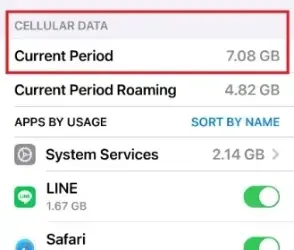
“Settings” ➔ “Cellular”
➔ “Current Period” shows the total mobile data usage for the current period.
Scroll down to see the mobile data usage for individual apps.
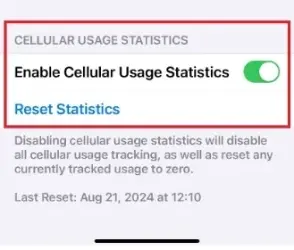
🌸Reset Statistics Before Viewing
“Settings” ➔ “Cellular”➔ scroll to “Reset Statistics” to reset the mobile data usage for the “Current Period” to 0. 📢If you want to view the mobile data usage for a different SIM, please first switch the “Cellular Data” SIM.
【 Android Device】

The Android system may have different screens and operation methods depending on the brand and model. Here, we will explain how to check mobile data usage using the Galaxy A55 as an example.

🌸View Data Usage
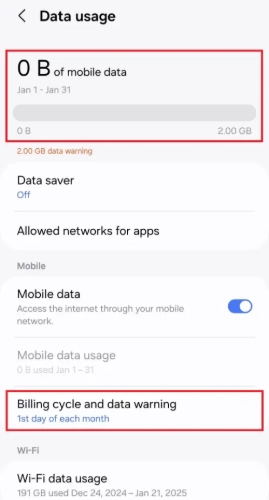
“Settings”➔”Connections”➔”Data usage”
You can view the total amount of mobile data used in the current billing cycle.
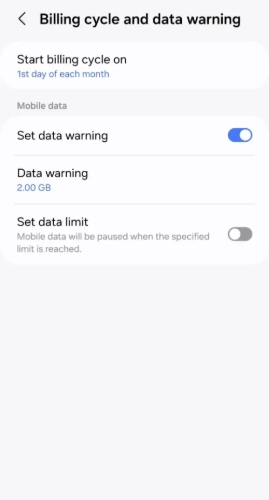
🌸Set Billing Cycle Before Viewing Statistics
“Settings”➔”Connections”➔”Data usage”➔”Billing cycle and data warning”➔to reset the mobile data usage statistics.

Proof of Address Upload

In accordance with the regulations of Japan’s Ministry of Internal Affairs and Communications, applicants for a Japanese phone number are required to provide **proof of the subscriber’s registered address or current residential address**.

<eSIM will be delivered by email>
<Physical SIM cards can only be shipped to the address shown on the proof of address>

■ Proof of Current Residential Address
Please provide **one** of the following documents showing **both the subscriber’s name and current residential address:
・Driver’s license, certificate of residence, or a tax-related document issued by a government authority
・Utility bill (electricity, gas, or water)
・Credit card statement or bank statement, etc.

■ If you would like the SIM card to be delivered to a hotel in Japan, please provide **both** of the following:
1. Hotel reservation confirmation showing the subscriber’s name and check-in date
2. Proof of current residential address

Device Compatibility for International Roaming

📢 All devices can be used normally in Japan. “Compatible for use overseas” refers specifically to compatibility with docomo’s international roaming VoLTE voice calling service while outside Japan.

Since Japan and many other countries have discontinued 3G services, your device must support VoLTE calling in order to use docomo’s international roaming voice service.

⚠️ Some devices may not work at all overseas, while others may only be able to receive SMS but cannot make or receive voice calls.

🚫 Devices Reported as Incompatible by Customers
  • Hong Kong / Macau version iPhone 16e / 17e (with physical SIM tray)
  • Taiwan version Samsung devices
  • Sony Xperia XZ2 Premium, Xperia 10 V, Xperia 10 IV
  • HTC U20
  • ASUS Zenfone 8 Flip
  • Sharp Aquos sense 6S
✅ Devices Reported as Compatible by Customers

🍎 iPhone
SE, SE2, SE3
X, XR, XS
11, 12 Pro, 13, 13 mini, 13 Pro Max, 14, 14 Pro, 15, 15 Pro, 16, 16 Pro, 16 Pro Max, 17 Pro, 17 Pro Max

🤖 Android
Google Pixel series
Redmi Note 12 Pro 5G, 12C
OPPO Reno 14 Pro 5G
vivo V29 / V40 / Y55
G-PLUS
Sony Xperia 1 III / XQ-DQ72, Xperia 1 V / 5 II
ASUS ROG 8, ROG 9, Zenfone Max Pro M2
HUAWEI Mate 50 Pro
SHARP AQUOS wish5

💡 Note: Android devices may have different hardware specifications depending on the country or region where they were manufactured or sold. Actual compatibility may therefore vary.