Archives FAQs

How to Use Your SIM Card After Receiving It

Basic Usage (Voice Calls / SMS)

Simply insert the SIM card into your smartphone, and you can immediately use voice calls and SMS!

Your smartphone will automatically display your Japanese phone number, making it very convenient 👍

📞 Voice Call & SMS Settings

If you only use voice calls and SMS after inserting the SIM card:

You do not need to connect to Wi-Fi.
You do not need to configure mobile data settings.

📶 Mobile Data Settings (For Use in Japan)

If you want to use mobile data:

iPhone: You need to download the configuration profile.

Android: You need to manually configure the APN settings.

Can I receive Taiwan calls and SMS for free while in Japan?

Yes, you can use this service if the following conditions are met:

✅ Your smartphone is connected to Wi-Fi
✅ The Wi-Fi Calling function is enabled
✅ You are using a supported device (iPhone / Android)
✅ Your SIM card remains active (not suspended or cancelled)

💰 Charges (Important)
Wi-Fi Calling is treated as if you are using the service in Taiwan.

📞 Making calls
・Calling a Taiwan number → Taiwan domestic call charges
・Calling a Taiwan mobile number → Taiwan domestic rates
・Calling overseas (e.g., Japan) → International call charges

👉 No international roaming charges will apply

📲 Receiving calls
・Receiving calls from Taiwan → Free (same as receiving calls in Taiwan)

🌟 Benefits
・Good call quality when the Wi-Fi connection is stable
・You can make and receive calls without enabling international roaming

How to check my mobile data usage?

【 iOS Device】

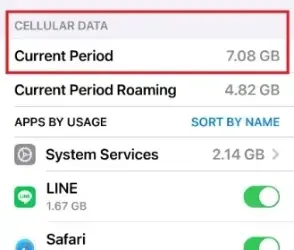
🌸View Used Mobile Data
“Settings” ➔ “Cellular”
➔ “Current Period” shows the total mobile data usage for the current period.
Scroll down to see the mobile data usage for individual apps.

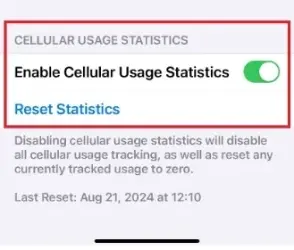
🌸Reset Statistics Before Viewing
“Settings” ➔ “Cellular”➔ scroll to “Reset Statistics” to reset the mobile data usage for the “Current Period” to 0. 📢If you want to view the mobile data usage for a different SIM, please first switch the “Cellular Data” SIM.

【 Android Device】

The Android system may have different screens and operation methods depending on the brand and model. Here, we will explain how to check mobile data usage using the Galaxy A55 as an example.

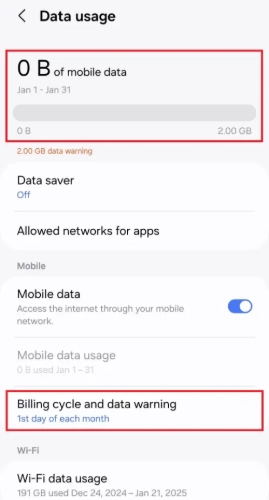
🌸View Data Usage
“Settings”➔”Connections”➔”Data usage”
You can view the total amount of mobile data used in the current billing cycle.

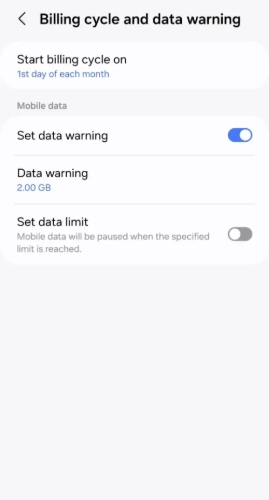
🌸Set Billing Cycle Before Viewing Statistics
“Settings”➔”Connections”➔”Data usage”➔”Billing cycle and data warning”➔to reset the mobile data usage statistics.

Proof of Address Upload

In accordance with the regulations of Japan’s Ministry of Internal Affairs and Communications (MIC), applicants for a Japanese phone number are required to submit their passport and proof of their current residential address.

<eSIM will be delivered by email>
<Physical SIM cards can only be shipped to the address shown on the proof of address>

■ Proof of Current Residential Address
Please provide **one** of the following documents showing **both the subscriber’s name and current residential address:
・Driver’s license, certificate of residence, or a tax-related document issued by a government authority
・Utility bill (Electricity bills / Gas bills / Water bills / Telephone bills, etc.)
・Credit card statement or bank statement, etc.

■ If you would like the SIM card to be delivered to a hotel in Japan, please provide **both** of the following:
1. Hotel reservation confirmation showing the subscriber’s name and check-in date
2. Proof of current residential address
※ Shipping to Japan forwarding services or relatives’/friends’ addresses is not allowed

Device Compatibility for International Roaming

📢 Normal Usage Within Japan: Compatibility Guide for docomo International Roaming VoLTE Calls

As 3G networks have been shut down in Japan and many other countries, you must use a VoLTE-compatible phone model to utilize docomo’s international roaming voice call services.

⚠️ Please note that certain phone models may completely fail to work overseas, or may only be able to receive SMS while being entirely unable to make or receive voice calls.

💡 Reminder: For Android devices, actual compatibility may vary depending on the country of manufacture and regional hardware variations.

■ ASUS
Model NameModel NumberRoaming VoLTE CallsRoaming SMSNotes
ASUS ROG Phone 8、ASUS ROG Phone 9
ASUS ZenFone Max Pro (M2)
■ Google Pixel
Model NameModel NumberRoaming VoLTE CallsRoaming SMSNotes
IGlobal Version

■ HUAWEI
Model NameModel NumberRoaming VoLTE CallsRoaming SMSNotes
HUAWEI Mate 50 Pro
■ iPhone
Model NameModel NumberRoaming VoLTE CallsRoaming SMSNotes
16e、17e physical SIM modelMHRW4ZP/A TW/TH/VNUnable to make calls while overseas, but SMS can be received after configuring the APN.
6 、7、X、11、12、13、14、15、16、17 SeriesGlobal Version
■ OPPO
Model NameModel NumberRoaming VoLTE CallsRoaming SMSNotes
OPPO Reno14 Pro
OPPO A79 5GCPH2557(Global Version)
■ Samsung
Model NameModel NumberRoaming VoLTE CallsRoaming SMSNotes
Samsung Galaxy S SeriesTW、US、HK
Samsung Galaxy A SeriesTW
■ SHARP
Model NameModel NumberRoaming VoLTE CallsRoaming SMSNotes
SHARP AQUOS wish5
■ SONY
Model NameModel NumberRoaming VoLTE CallsRoaming SMSNotes
Xperia 1 VXQ-DQ72 TW/HK
■ vivo
Model NameModel NumberRoaming VoLTE CallsRoaming SMSNotes
vivo V29 5G、vivo V40 5G、vivo Y55、vivo X300
■ Xiaomi
Model NameModel NumberRoaming VoLTE CallsRoaming SMSNotes
Redmi 12C、Note 11 Pro+ 5G、Redmi Note 12 Pro+ 5GDial ##86583## directly to enable or disable the VoLTE calling function.
Xiaomi 12T
POCO F8 Ultra

When does the validity period start counting?

  1. After purchase and receiving the activation URL, the validity period does not start counting immediately. You can open the URL to check the activation information in advance.
  2. After pressing the “Issue” button and generating the eSIM activation QR code, if you do not install or use the eSIM, the validity period will automatically start counting from the 3rd day after the QR code is issued.
  3. After adding the eSIM to your smartphone, the validity period will not start while you are outside Japan. The validity period begins when you arrive in Japan and your device connects to a Japanese mobile network.
    ※ However, if you have not arrived in Japan by the 3rd day after the QR code is issued, the validity period will start automatically.

How many GB of a product should I purchase?

🅰️ Please refer to the common questions in the “Pre-purchase Check” such as “How many GB are needed in one day?“, “How long can 1GB last for internet usage?” and “How to check my mobile data usage?” to make your decision.

📢 When the high-speed data you purchased runs out, your speed will not be cut off. Instead, it will be reduced to 200kbps, and you can still send text messages normally.

📢 You can always add more data capacity through this website. For urgent requests on holidays or nights, please contact customer service for immediate assistance.